Centralized Access to Deployment Keys with AWS KMS Signer
How we solved the problem of individual developer keys for smart contract deployments by using AWS KMS Signer eliminating security risks during employee off-boarding while maintaining trust and auditability.
The Problem
Recently, we encountered an issue where smart contracts were being deployed using individual developer keys, which created complications during employee off-boarding. We needed a centralized, secure way to manage deployment keys without giving any single developer direct access to private key material.
The Initial Approach
We initially considered using Web3 Signer to send smart contract transactions, get them signed, and broadcast them to the network.
However, this approach comes with challenges:
- Security concerns
- Uptime requirements
- Server costs
- Ongoing maintenance and upgrades
The Solution AWS KMS Signer
Instead, we opted for AWS KMS Signer, which turned out to be an excellent solution.
Key Properties of KMS Signer
- The key cannot be imported (from an EOA)
- The key cannot be exported (as an infrastructure engineer, you must ensure the key is never deleted under any circumstance)
- KMS guarantees the key has never been compromised prior to creation
- The key cannot be compromised after creation only AWS infrastructure has access to the raw key material
How It Works
- Create a KMS key → it provides a public key
- Convert it to an Ethereum address
- Fund the account for smart contract deployment
Integration with Forge
If you're familiar with Forge, its latest release added native support for signing transactions directly using a KMS key, provided you have the correct IAM permissions.
forge create --aws
Reference: Forge Create Documentation
This allows you to:
- Sign and broadcast transactions without ever having direct access to the private keys
- Use a consistent key for deploying smart contracts, which builds trust among users
Security Considerations
Risk: If the IAM role is compromised, any transaction can be signed and broadcast meaning the deployment wallet funds could be drained.
Mitigation: Rather than granting IAM access directly to developers, integrate the signing process into a GitHub Actions workflow where transactions are processed only after the required approvals.
Step-by-Step Walkthrough
Step 1 : Create a New KMS Key
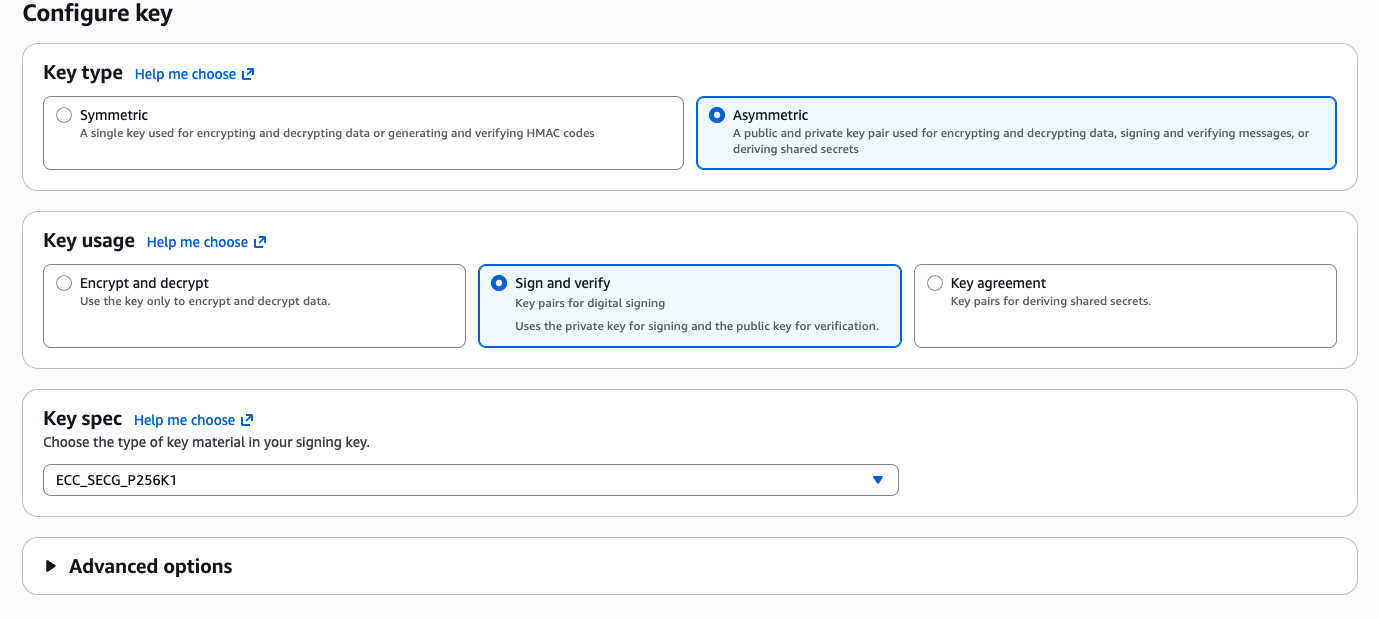
Head over to the AWS KMS console and create a new Asymmetric key for signing transactions. Set the key algorithm to ECC_SECG_P256K1.
Step 2 : Get the Public Key and Convert to an Ethereum Address
Once the key is created, retrieve the public key from the KMS console.

However, this key is not in an Ethereum address format. To convert it, you can write your own script or use mine:
Here's what the script does:
- Parses a PEM-encoded secp256k1 public key (e.g., from AWS/GCP KMS)
- Extracts the raw 64-byte public key (X, Y coordinates) from the DER-encoded SPKI structure
- Hashes it with keccak256
- Derives the Ethereum address from the last 20 bytes of the hash
- Returns a checksummed address via
ethers.getAddress()
Step 3 : Fund the Address
Fund the derived Ethereum address with ETH (or Sepolia ETH if you want to verify on testnet first) so it can pay for smart contract deployment gas fees.
Step 4 : Create an IAM Role with Permissions
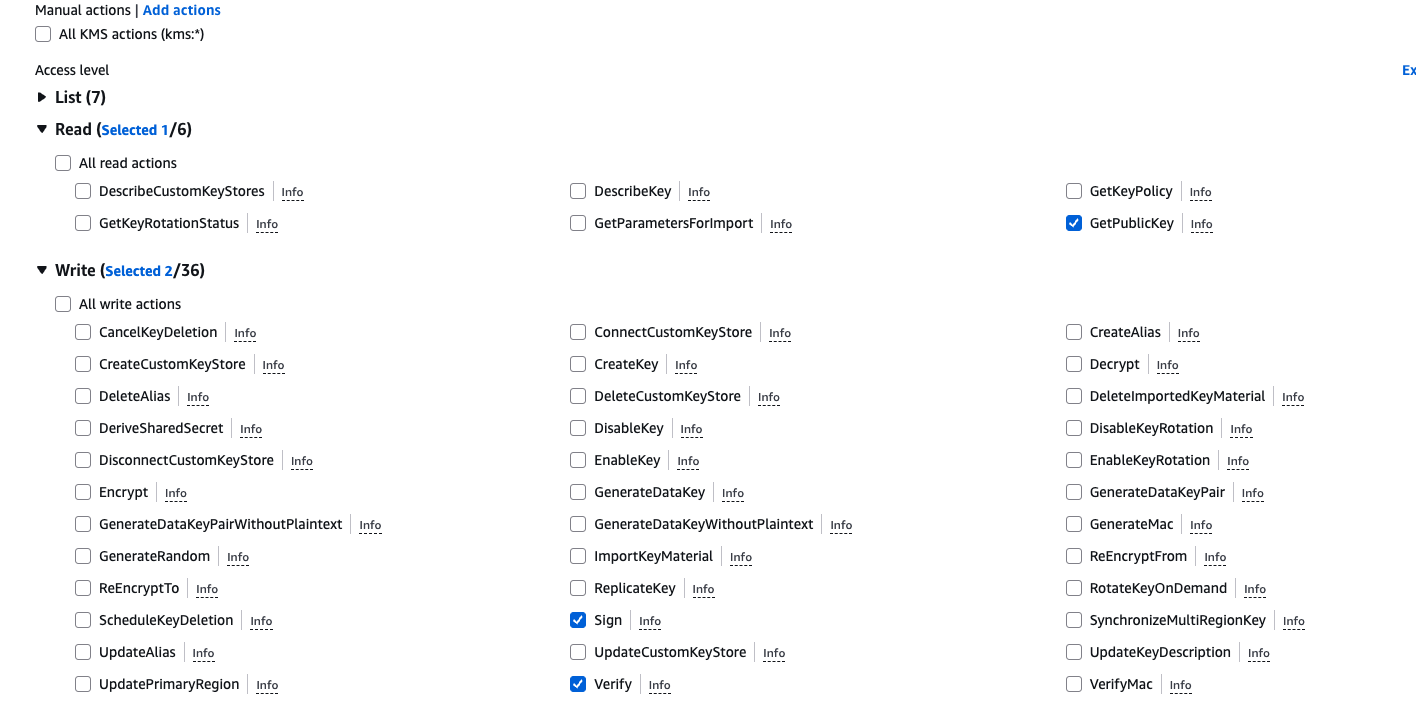
Create an IAM role or user with the necessary KMS permissions to sign transactions.
Step 5 : Deploy with Forge
Use forge create with the --aws flag to sign and deploy your contract directly using the KMS key:
forge create src/MyContract.sol:MyContract \
  --aws \
  --rpc-url <RPC_URL> \
  --verify \
  --etherscan-api-key <API_KEY>
The
--etherscan-api-keyflag is used for verifying the contract on Etherscan. You can skip it if verification isn't needed.